The Chronometer
Repair the fleet's broken navigation log, then use the complete trace it produces to find why vessels arrive carrying the wrong cargo.
Mission Objective
- Every commission appears in the navigation log (Jaeger) as a single, connected trace, unbroken from the commission office (Backstage) through the shipyard (Argo Workflows) and the harbor master (Argo CD)
- Every vessel sails carrying the provisions it was commissioned to carry
Key Learnings
- How trace context crosses an asynchronous boundary with no call chain: a commission carries its W3C traceparent to a push-triggered pipeline, so its spans continue the same trace instead of starting a new one
- Why a distributed trace reveals what per-tool logs cannot: the value that flowed through each step, so a fault surfaces where the data diverges
- How to read that trace in Jaeger to localise a fault to a single service by following one attribute across the whole voyage
Best Suited For
Platform and DevOps engineers who already know how the delivery pipeline fits together and want to see how a distributed trace ties it into one story. You should be comfortable with Kubernetes, YAML, and reading a tool's logs and UI. Prior exposure to OpenTelemetry, trace context propagation, and a trace viewer like Jaeger helps, but the focus here is using a trace to reason across service boundaries, not any one tool.
The Story
Every commission the office issues is supposed to leave one clean line in the navigation log: the moment a captain fills in the papers, the yards that build and deliver the vessel, and the harbor master bringing it into formation, all recorded as a single voyage you can read end to end. Read the log and you know exactly what happened to any vessel, and when.
Lately the log lies. It records the commission office plainly enough, then goes dark the instant a vessel leaves for the yards: the shipyard's and harbor master's work never appears on the same line. And at the far end of the voyage, captains keep signing for the wrong cargo, salt-pork where citrus was ordered, though every yard along the route reported a clean, successful run. No single tool shows anything wrong.
Your mission: repair the log so a commission reads as one unbroken voyage again, from the office all the way to open water, then use that complete picture to find where the cargo goes astray, and set it right.
Architecture
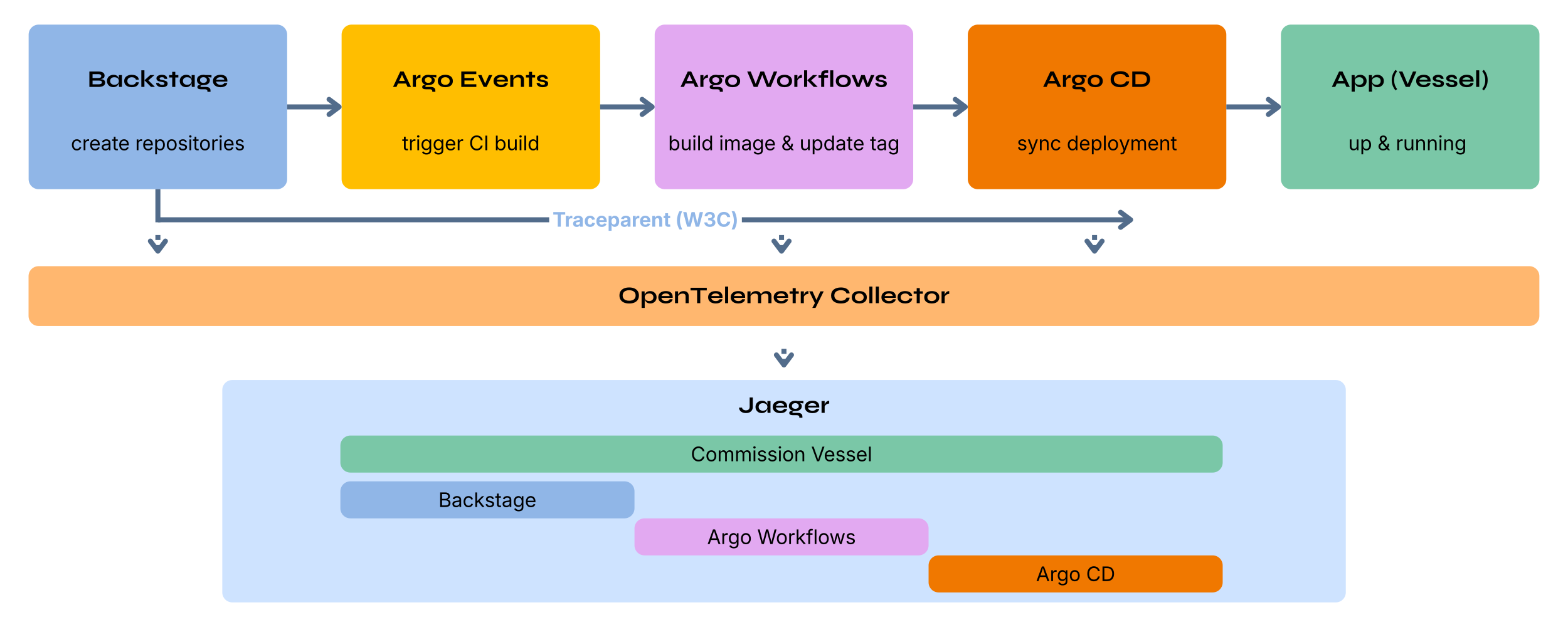
This level adds a tracing overlay to the Sea Trial delivery pipeline: every stage now reports spans to an OpenTelemetry Collector, which forwards them to Jaeger. The commission office opens the trace and hands its context to the pipeline, so one commission should read as a single connected voyage: commission <vessel> -> enter parameters and scaffold repos (Backstage) -> ci pipeline (Argo Workflows) -> rollout (Argo CD).
The cargo rides that trace at three checkpoints, so you see not just that it is wrong but where it changed: provisions.ordered (root span, what was selected), provisions.declared (rollout span, what the deployment sets), and provisions.reported (rollout span, what the running vessel says it carries). In a healthy voyage all three agree.
Your repairs live in the vessel commissioning template under backstage/templates/vessel-commissioning-template/ (template.yaml and the files under content/). Everything else, the platform/ manifests and the Backstage tracing setup, is working: read it to see how the trace is carried out to sea, but you won't need to change it.
This level runs a real container build, so your Codespace uses a larger (4-core / 16 GB) machine. Give the pipeline a few minutes after commissioning; the delivery spans land in Jaeger once the rollout completes.
A quick translation from the story to the tools: a vessel is a small service you deploy; its cargo (provisions) is a value it is commissioned to carry, set in its deployment and reported by the running service. The commission office is Backstage, the shipyard is Argo Workflows, the harbor master is Argo CD, and the navigation log is Jaeger. A commission's voyage is the single distributed trace that should span all of them.
Ready to start?
Launch in a preconfigured devcontainerdevelopment container: a portable, reproducible coding environment defined by a configuration file
Free GitHub account required
Walkthrough
Get Started
Open in GitHub Codespaces. The devcontainerdevelopment container: a portable, reproducible coding environment defined by a configuration file is pre-configured and starts automatically. When you push from Codespaces, GitHub forks the repository to your account automatically.
Prefer working locally? Clone the repo and open it in any editor that supports the Dev Containers specification (VS CodeVisual Studio Code, JetBrains, and others). The devcontainer config will be detected automatically.
Open the Commission Office
Start Backstage with
make backstage. The first run compiles for ~30-60s; once it's up, the commission office is available in your browser on port 3000. Leave it running in that terminal; restart any time with Ctrl-C thenmake backstage.The rest of the platform (Gitea, Argo Events, Argo Workflows, Argo CD, the OpenTelemetry Collector, and Jaeger) is already running in the cluster.
Explore the UIs
Open the Ports tab and navigate to each service:
- Port 3000: Backstage. The commission office and your cockpit. Start it with
make backstage, then commission vessels. Signs in as a guest, no credentials needed. - Port 30103: Jaeger. The navigation log: each commission's distributed trace, across Backstage, Argo Workflows, and Argo CD. No sign-in required.
- Port 30112: Gitea (admin / a-super-secure-password). The archives: each vessel's code and deployment repositories and the container registry.
- Port 30113: Argo Workflows. The shipyard: the delivery workflow runs, step by step, with per-step logs. No sign-in required.
- Port 30100: Argo CD (readonly / a-super-secure-password). The harbor master: each vessel's Application, sync status, and health.
- Port 3000: Backstage. The commission office and your cockpit. Start it with
Sail a Commission and Read the Log
In Backstage, go to Create and run the Commission a Vessel template. Pick a cargo you'll remember (say Citrus), and let the vessel sail. Delivery still works, but the records don't add up. You have two instruments to check what really happened:
- Greet the vessel. Once it's running,
make ahoireports the cargo it's actually carrying. Is it what you ordered? - Open the log. In Jaeger (port 30103), search service
backstage, operationcommission <vessel>, and open the trace. Read it from the commission office outward: how much of the voyage actually reached the log?
The trace is your instrument for both. It carries the cargo along the voyage (
provisions.ordered->provisions.declared->provisions.reported), so once the log reads true end to end, Jaeger is where you follow the cargo from order to arrival and find where it goes astray.- Greet the vessel. Once it's running,
Repair the Log, Then the Cargo
Both repairs live in the vessel commissioning template:
backstage/templates/vessel-commissioning-template/Start with the log. Read how a commission carries its trace context out to the pipeline, and how the pipeline picks it back up off the push it reacts to; the two need to line up on the same commit. With the voyage whole, the trace shows the cargo at each checkpoint (
provisions.ordered->provisions.declared->provisions.reported): follow it and let it tell you which stage the cargo survives and which one it doesn't.Test a fix by commissioning a fresh vessel and watching it sail. If you edited
template.yaml, reload it into Backstage first so the next commission picks up your change:make reload-template
Complete Your Challenge
- When you push from Codespaces, GitHub forks the repository to your account automatically. If you are working locally, fork the repository on GitHub before pushing.
- Verify your solution:
If it passes, it generates a Certificate of Completion you can paste into the discussion.make verify - Share your solutions in the challenge thread on community.offon.dev.
Completed the challenge? Share your achievement on LinkedIn
Toolbox
- Jaeger - The navigation log (port 30103). Shows each commission's trace; search by service
backstageand operationcommission <vessel>to open a voyage, then read its spans and their attributes. - Backstage - The commission office and your cockpit (port 3000). Commission a vessel from Create; its page carries a Voyage log card that links to the trace.
- Argo Workflows - The shipyard (port 30113). Runs the multi-step build-and-deliver workflow and emits the
ci pipelinespans. - Argo CD - The harbor master (port 30100). Reconciles each vessel into the cluster and emits the
rolloutspan. - OpenTelemetry Collector - The signal station every component reports spans to; it forwards them on to Jaeger. Part of the working tracing setup, here to read, not to change.