This walkthrough contains the full solution. Try solving the challenge yourself first, then come back if you get stuck or want to compare approaches.
Understanding the Setup
The challenge uses three tools working together:
- Argo CD ApplicationSet automatically generates Applications for multiple environments.
- Git directory generator scans for directories in the
overlays/folder and findsstagingandprod. - Kustomize manages environment-specific configuration. The base holds the common deployment and service; overlays hold environment-specific customisations.
The file to fix is adventures/01-echoes-lost-in-orbit/beginner/manifests/appset.yaml. Here is the broken starting state:
apiVersion: argoproj.io/v1alpha1
kind: ApplicationSet
metadata:
  name: echo-server
  namespace: argocd
spec:
  generators:
    - git:
        repoURL: __REPO_URL__
        revision: HEAD
        directories:
          - path: adventures/01-echoes-lost-in-orbit/beginner/manifests/overlays/*
  template:
    metadata:
      name: echo-server
      labels:
        app.kubernetes.io/managed-by: argocd
    spec:
      project: default
      source:
        repoURL: __REPO_URL__
        targetRevision: HEAD
        path: adventures/01-echoes-lost-in-orbit/beginner/manifests/overlays/{{path.basename}}
      destination:
        server: https://kubernetes.default.svc
        namespace: echo
      syncPolicy:
        syncOptions:
          - CreateNamespace=true
Solution Steps
Two Distinct Applications in Argo CD
Opening the Argo CD dashboard (port 30100), you won't see any applications despite the ApplicationSet being present.
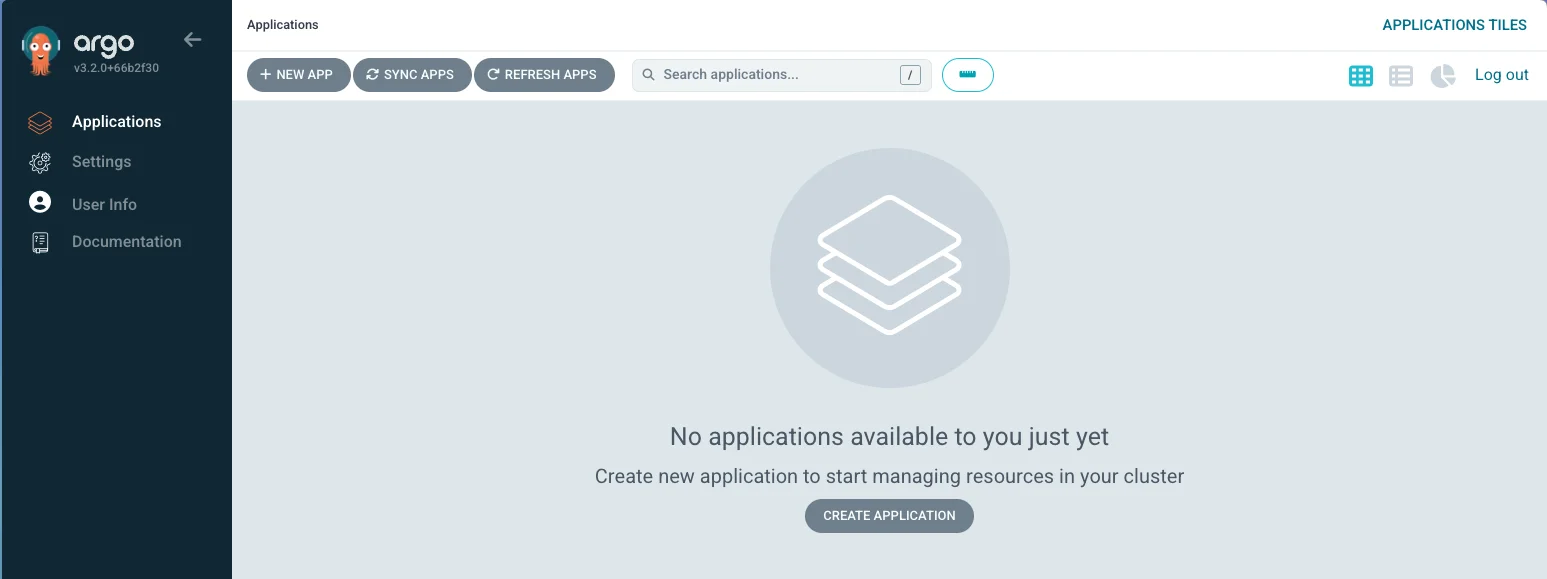
Check whether the ApplicationSet exists:
kubectl get applicationset -n argocdYou should see
echo-serverlisted. That means Argo CD is at least aware of our ApplicationSet. Let's dig deeper and check its status:kubectl get applicationset echo-server -n argocd -o yamlScroll to
status.conditions. You should see:- message: 'ApplicationSet echo-server contains applications with duplicate name: echo-server' reason: ErrorOccurred status: "False"The template uses a static
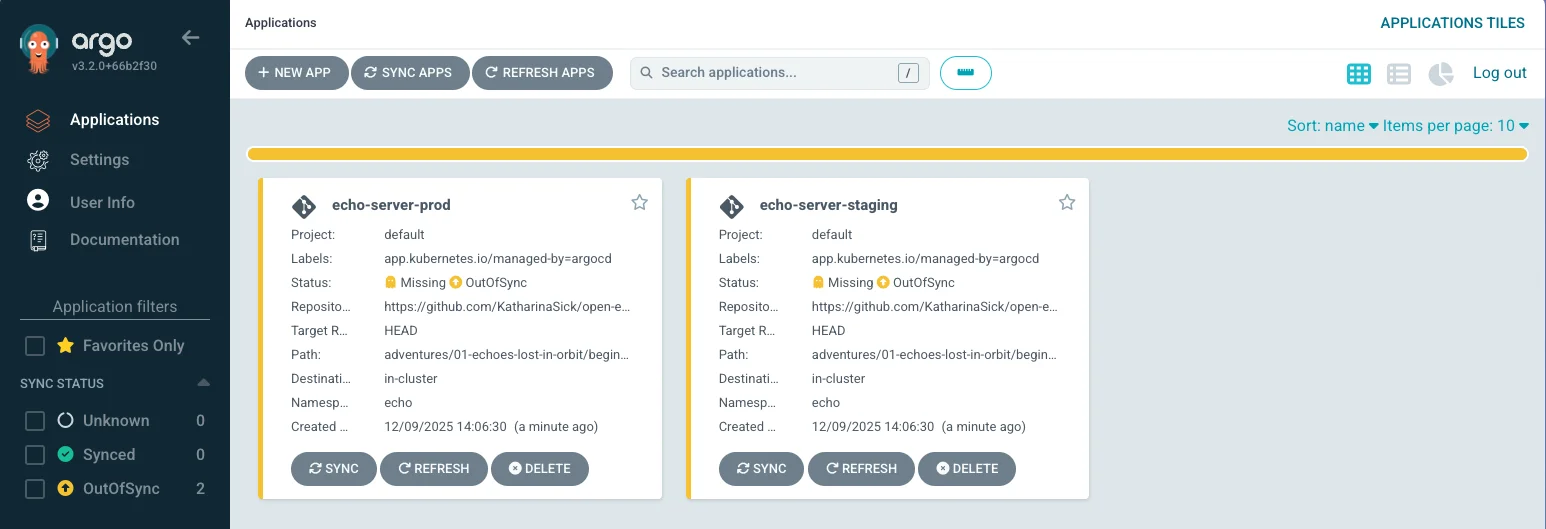
name: echo-serverfor every generated Application. Because both staging and prod generate an Application with that same name, Kubernetes rejects the duplicate. The fix is to include the directory name in the Application name:name: echo-server-{{path.basename}}Apply the fix:
kubectl apply -n argocd -f adventures/01-echoes-lost-in-orbit/beginner/manifests/appset.yamlGo back to the dashboard. You should now see two progressing applications:
key takeaways
- ApplicationSets use templates to generate multiple Applications, and names must be unique per environment.
- The Git directory generator creates one Application per overlay directory, so template variables like {{path.basename}} are essential for dynamic naming.
- The ApplicationSet and Application status conditions are the first place to look when something isn't generating.
Each Application in Its Own Namespace
Both applications now appear in Argo CD but they deploy to the same namespace: echo. Each environment needs its own namespace for isolation and to prevent resource conflicts.
The same template variable technique fixes the namespace. Update the destination in the manifest:
destination:
  server: https://kubernetes.default.svc
  namespace: echo-{{path.basename}}
Apply the change. Argo CD will now target
echo-stagingandecho-prodrespectively:kubectl apply -n argocd -f adventures/01-echoes-lost-in-orbit/beginner/manifests/appset.yamlkey takeaways
- Template variables work in any field of the ApplicationSet spec, not just the name.
- Namespace isolation prevents resource name collisions and makes per-environment RBAC and quotas straightforward.
Auto Sync and Self-Healing
The Applications now target separate namespaces but aren't syncing yet. We need two fixes: automatic sync from Git, and automatic revert of manual cluster changes.
By default, Argo CD requires manual sync triggers. Enable automated sync in the ApplicationSet:
syncPolicy: automated: enabled: true syncOptions: - CreateNamespace=truekubectl apply -n argocd -f adventures/01-echoes-lost-in-orbit/beginner/manifests/appset.yamlTip
By default, Argo CD polls Git every 3 minutes. You can speed this up by configuring a webhook, but for this challenge a manual refresh in the UI is fine.
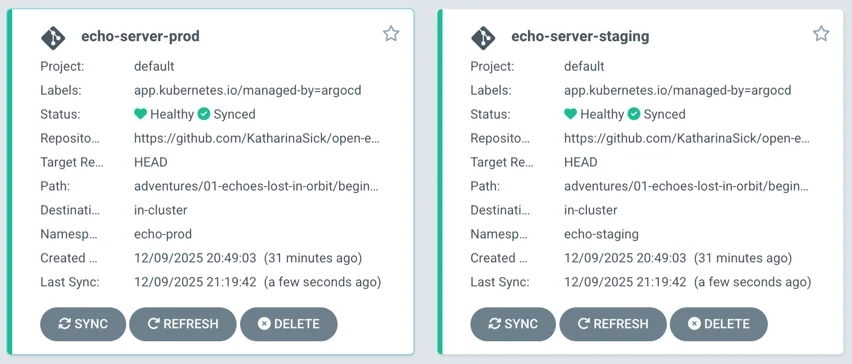
Auto sync alone won't revert direct cluster changes. Add
selfHeal: trueto make Argo CD continuously reconcile against Git:syncPolicy: automated: enabled: true selfHeal: true syncOptions: - CreateNamespace=trueTest it: scale a deployment manually and watch Argo CD revert it within seconds.
kubectl scale deployment echo-server-staging -n echo-staging --replicas=3
kubectl get pods -n echo-staging -w
Within seconds, Argo CD will detect the drift and scale it back down to 1 replica (as defined in Git).
key takeaways
- Auto sync ensures Git changes reach the cluster without manual intervention.
- Self-healing reconciles drift: any manual change to cluster state is reverted to match Git.
- Auto sync + self-heal together are the foundation of a GitOps workflow.
Automatic Pruning of Stale Resources
The last objective: resources deleted from Git should also be deleted from the cluster. Without pruning, removed manifests leave orphaned objects behind.
Add
prune: trueto the automated sync policy:syncPolicy: automated: enabled: true selfHeal: true prune: true syncOptions: - CreateNamespace=trueApply the final change:
kubectl apply -n argocd -f adventures/01-echoes-lost-in-orbit/beginner/manifests/appset.yamlInfo
Pruning is intentionally opt-in. Argo CD is cautious about deleting cluster resources automatically, so you must explicitly enable it.
key takeaways
- Pruning, combined with self-heal, gives you full GitOps: the cluster always matches the Git state exactly.
- Without pruning, deleted manifests leave stale objects that can cause resource conflicts or unexpected behaviour.
final result
Complete ApplicationSet
final result
Complete ApplicationSetAll four fixes applied. This ApplicationSet produces two isolated Applications with automated sync, self-healing, and pruning.
apiVersion: argoproj.io/v1alpha1
kind: ApplicationSet
metadata:
  name: echo-server
  namespace: argocd
spec:
  generators:
    - git:
        repoURL: __REPO_URL__
        revision: HEAD
        directories:
          - path: adventures/01-echoes-lost-in-orbit/beginner/manifests/overlays/*
  template:
    metadata:
      name: echo-server-{{path.basename}}  # unique name per environment
      labels:
        app.kubernetes.io/managed-by: argocd
    spec:
      project: default
      source:
        repoURL: __REPO_URL__
        targetRevision: HEAD
        path: adventures/01-echoes-lost-in-orbit/beginner/manifests/overlays/{{path.basename}}
      destination:
        server: https://kubernetes.default.svc
        namespace: echo-{{path.basename}}  # environment-specific namespace
      syncPolicy:
        automated:
          enabled: true     # automatic sync from Git
          selfHeal: true    # reverts manual cluster changes
          prune: true       # deletes removed resources
        syncOptions:
          - CreateNamespace=true
Transmissions Restored
Both Applications are healthy, syncing continuously from Git, reverting any drift the moment it appears, and cleaning up what no longer belongs. The Staging Moonbase and the Production Outpost are online. The Echo Server is echoing again.
The whispering cloud-dwellers of Nebulon and the rhythmic click-speakers of Crustacea Prime can hear each other once more. The GitOps Starliner moves on.
The Starliner carries more than one crew. See how others got the echo back.