The Twelve Tables
Fix broken Kyverno policies to restore proper admission control.
Mission Objective
- All workloads missing the
republic.rome/genslabel are blocked at admission with a clear policy violation message - All workloads running as privileged containers are blocked at admission with a clear policy violation message
- All pods declaring
republic.rome/traveler: peregrinusautomatically receive therepublic.rome/travel-permit: grantedlabel - All other workloads deploy and run successfully in the cluster
Key Learnings
- How Kyverno ValidatingPolicy resources and CELCommon Expression Language validation expressions work
- The difference between Audit, Deny, and Warn validation actions
- How to use custom label keys to enforce workload identity standards
- How Kyverno MutatingPolicy resources automatically patch incoming workloads at admission
Best Suited For
Platform engineers, SREsSite Reliability Engineers, and developers curious about Kubernetes security - no prior Kyverno experience needed, but familiarity with basic kubectl and YAML will help.
The Story
The Republic's legal scholars have been busy - perhaps too busy. In their haste to codify the Twelve Tables, the foundation of the Republic's legal system, they introduced errors that now threaten the city's order. Workloads that should be blocked are running freely, and workloads that should be allowed are being turned away at the gates.
Another scholar left a note: "I tried to set up policies for privileged containers and required labels, but something's off - I can't figure out why the wrong things are getting through. There was also supposed to be a system for automatically issuing travel permits to foreign visitors, but that one is broken too."
Your mission: investigate the Kyverno policies and restore proper admission control before chaos reaches the city.
Architecture
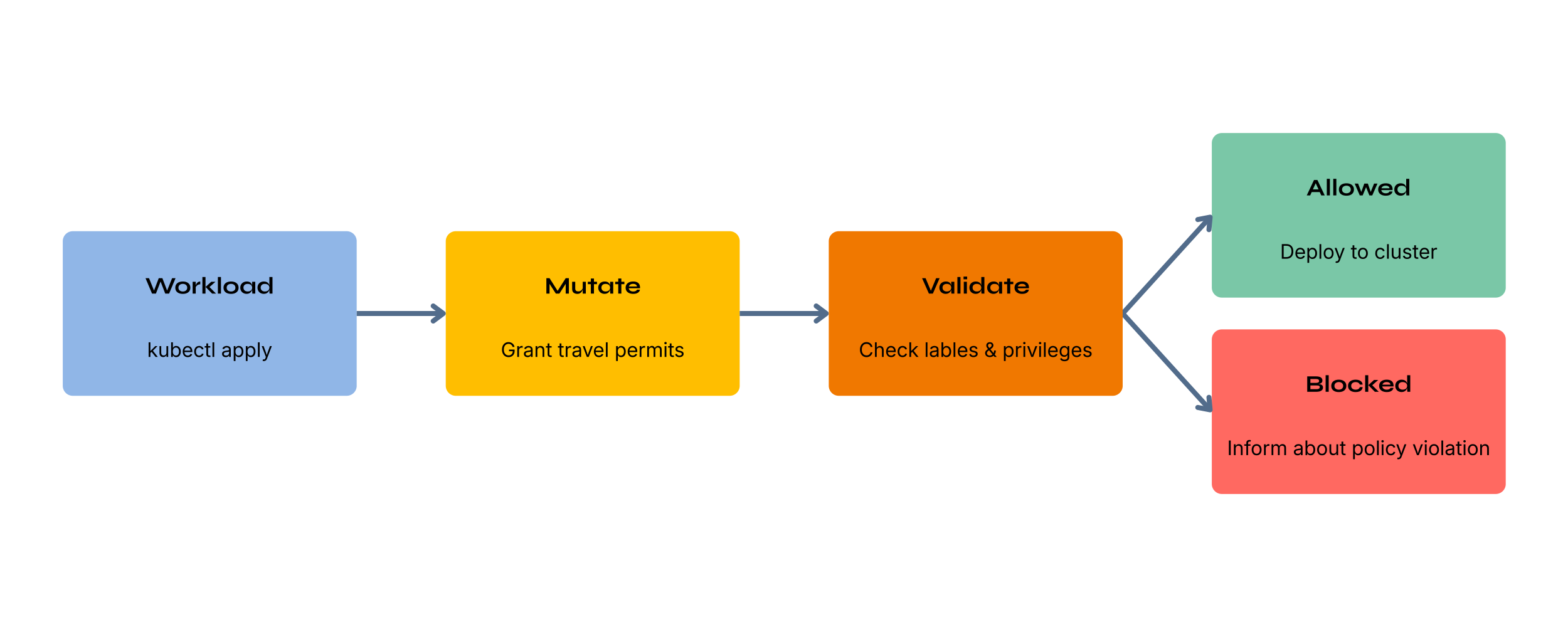
The Twelve Tables enforced Roman law at the gates - before a citizen could act, not after the damage was done. Kyverno works the same way: it intercepts every workload request before it reaches the cluster. A misconfigured policy doesn't just fail to enforce - it fails silently, letting non-compliant workloads slip through while you assume everything is fine.
Your Codespace comes with a Kubernetes cluster and Kyverno pre-installed. Three broken policies are already deployed in manifests/policies/ - two ValidatingPolicy resources and one MutatingPolicy. Edit them directly and re-apply with kubectl. The pods in manifests/pods/ are for reference only - no GitOpsGit Operations, no dashboards.
Ready to start?
Launch in a preconfigured devcontainerdevelopment container: a portable, reproducible coding environment defined by a configuration file
Free GitHub account required
Walkthrough
Get Started
Open in GitHub Codespaces. The devcontainerdevelopment container: a portable, reproducible coding environment defined by a configuration file is pre-configured and starts automatically. When you push from Codespaces, GitHub forks the repository to your account automatically.
Prefer working locally? Clone the repo and open it in any editor that supports the Dev Containers specification (VS CodeVisual Studio Code, JetBrains, and others). The devcontainer config will be detected automatically.
Explore the Cluster
When your Codespace is ready, four pods are already running - or trying to. Open a terminal and check what's going on:
kubectl get podsInspect why a pod was blocked or admitted:
kubectl describe pod <pod-name>Check the policies that are in place:
kubectl get validatingpolicies
kubectl get validatingpolicy require-labels -o yaml
kubectl get validatingpolicy no-privileged-containers -o yaml

kubectl get mutatingpolicies
kubectl get mutatingpolicy stamp-travel-permit -o yaml
You can also launch k9s for a terminal UI view of all cluster resources:
k9sNavigate to
ValidatingPolicyresources with:validatingpoliciesandMutatingPolicyresources with:mutatingpoliciesto inspect all three policies.Fix the Policies
Review the Objective and investigate what's wrong in
manifests/policies/.All three broken policies are in
manifests/policies/. Read them carefully - each has a different kind of misconfiguration.Test Locally with the Kyverno CLICommand Line Interface
Before applying to the cluster, you can use the
kyvernoCLI to test your policy changes locally against the workload manifests:kyverno apply manifests/policies/require-labels.yaml --resource manifests/pods/missing-labels.yaml kyverno apply manifests/policies/no-privileged-containers.yaml --resource manifests/pods/privileged.yaml kyverno apply manifests/policies/stamp-travel-permit.yaml --resource manifests/pods/peregrinus.yamlThis gives you fast feedback without touching the cluster.
Apply to the Cluster
Once you're happy with your changes, re-apply everything:
make applyThis re-applies the policies and re-deploys all workloads so you immediately see the effect of your changes.
Complete Your Challenge
- When you push from Codespaces, GitHub forks the repository to your account automatically. If you are working locally, fork the repository on GitHub before pushing.
- Verify your solution:
If it passes, it generates a Certificate of Completion you can paste into the discussion../verify.sh - Share your solutions in the challenge thread on community.offon.dev.
Completed the challenge? Share your achievement on LinkedIn
Toolbox
- kubectl - Apply and inspect cluster resources
- kyverno CLI - Test and lint policies locally before applying
- k9s - Explore cluster resources in a terminal UIUser Interface