The Compliance Engine
Repair the automated check that is meant to stop inaccessible code from shipping, and find out why it never caught the navigation barrier the company is being audited over.
Mission Objective
- Have the gate audit every step a customer moves through, not only the homepage.
- Find the navigation barrier that automated scanning has never reported.
- Fix it and have the gate verify the fix holds.
- Produce a report proving each customer journey step was audited and passes.
Key Learnings
- Why a green accessibility gate means nothing until you know which pages and states it actually tested. (WCAG 2.4: Navigable)
- Why automated scanners cannot detect faults that only exist when a user does something, and which layer catches them instead. (Test and Evaluate Accessibility)
- How a single-page application can silently break the navigation contract that assistive technology depends on, and what it takes to restore it. (WCAG 4.1: Compatible)
- How a compliance report is evidence of conformance over time: what was tested, how it was tested, and that it passed.
Best Suited For
Frontend developers who are comfortable with Playwright and automated accessibility scanning, and who want to understand what their compliance gate is actually measuring. Assumes familiarity with axe-core and the ARIA patterns from the intermediate level.
The Story
The components are repaired. The legal team needs proof of continuous compliance for the EAA audit next week. Every merge passes the accessibility check, and its run history has been green for months.
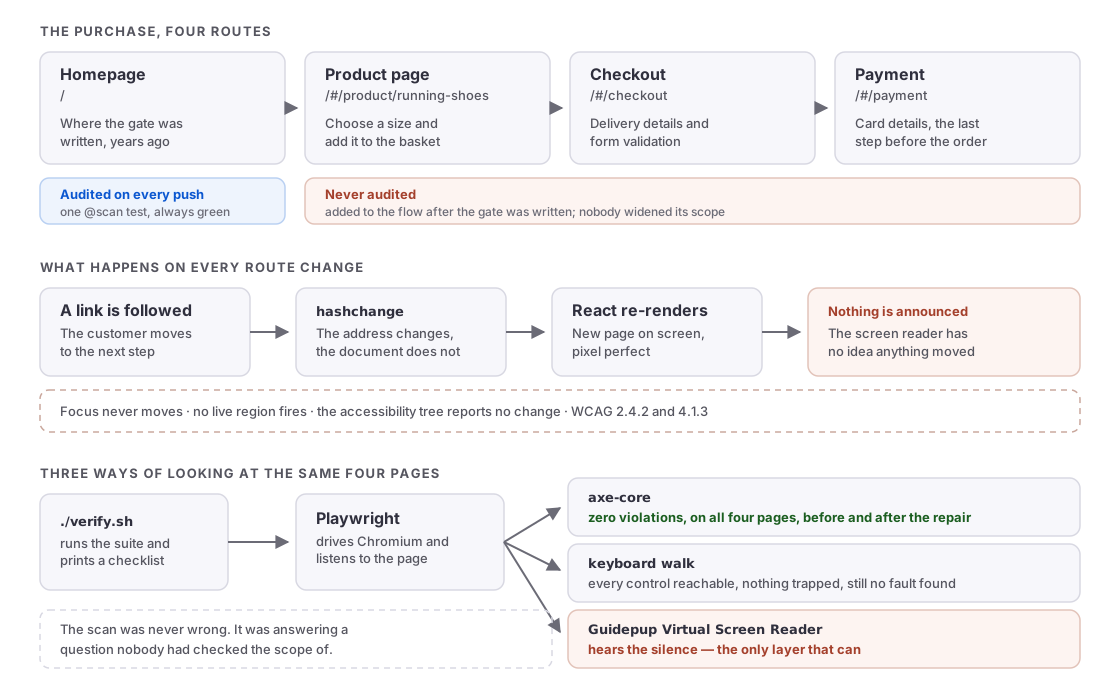
But one complaint in the original legal notice was never reproduced. A user reported that following any link left them with no idea where they had landed. The page had changed, and their screen reader carried on as though nothing had. Nobody could make the check report it.
The payment page was added to the flow after the gate was written, and the checkout before that. Nobody widened its scope. Its green history is not a history of the product being accessible, it is a history of the same page being checked over and over.
Architecture
A React and Vite storefront runs on port 5173 inside the Dev Container. All three checkout components arrive repaired: the basket confirmation is a proper modal, the size picker follows the ARIA combobox pattern, and the checkout form announces its errors to screen reader users.
The checkout flow has four steps: /#/ (homepage), /#/product/running-shoes (choose a size), /#/checkout (delivery details), and /#/payment (card details). The compliance gate was written for the first of those and has never been updated.
Routing lives in src/App.jsx, which decides what renders for each address. That file is yours to change once you have found the fault. The page components under src/pages/ and the repaired widgets under src/components/ are not.
Your editing surface: tests/compliance.spec.js (the gate), playwright.config.js (the reporter), and src/App.jsx (the fix). Leave everything else alone; it defines the problem.
Ready to start?
Launch in a preconfigured devcontainerdevelopment container: a portable, reproducible coding environment defined by a configuration file
Free GitHub account required
Walkthrough
Get Started
Open in GitHub Codespaces. The devcontainerdevelopment container: a portable, reproducible coding environment defined by a configuration file is pre-configured and starts automatically. When you push from Codespaces, GitHub forks the repository to your account automatically.
Prefer working locally? Clone the repo and open it in any editor that supports the Dev Containers specification (VS CodeVisual Studio Code, JetBrains, and others). The devcontainer config will be detected automatically.
Open the Store
The storefront is already running. Open the Ports tab in the editor, find ShopSmart on port 5173, and click the globe icon to open it in a browser tab. Codespaces serves it from an address ending in
.app.github.dev, so there is no localhost to visit.If it is not running, start it from the level directory with
make app.Add the product route to whatever address the Ports tab gave you:
<your-codespace>-5173.app.github.dev/#/product/running-shoesUse a browser tab rather than the editor's built-in preview. The preview cannot load the forwarded port while it is private.
If you would rather work inside the preview, make the port public first: in the Ports panel, right-click ShopSmart, choose Port Visibility, then Public, and reload the preview. Turn it back to Private when you are finished.
On a Mac, turn keyboard navigation on before you start. Safari does not move focus to links and buttons unless it is enabled, under System Settings, Keyboard, Keyboard navigation.
Explore the UIs
Open the Ports tab and navigate to each service:
- Port 5173: ShopSmart. The ShopSmart storefront.
Explore the Gate
Run the compliance gate as it stands:
npm run test:a11yIt passes. It has always passed.
Now look at what it actually does. Open
tests/compliance.spec.jsand read it. Which page does it visit? Follow a customer from the homepage to the payment page and count the steps the gate never sees.Then listen to the storefront. Add
?listento the address to open a panel showing what a screen reader would announce as you move around:<your-codespace>-5173.app.github.dev/?listenMove through the page with Tab, then follow a link to another page. Every address change is marked with a dim
·line, so you can tell what the reader said before a navigation from what it said after one.The same simulation is available to your tests through the helpers in
tests/lib/screen-reader.js.A coverage reference is linked in the storefront nav, at
/coverage-table.html. It records what the gate checked on its last run, and which testing layer is capable of detecting each kind of fault.Repair the Gate
Work in
tests/compliance.spec.js,playwright.config.js, andsrc/App.jsx.Start with coverage. Tag your new scanner tests
@scanso the verify script can find them. The gate should visit every page a customer passes through: homepage, product, checkout, and payment.axe-core reads the markup. If the markup is correct at every moment it looks, there is nothing for it to report, which tells you where to look next, not that you are done.
Tag your navigation tests
@transition. A detector for this moves between routes the way a customer would and asserts that the destination made itself known. Assert the outcome, not the mechanism.Once you have a failing
@transitiontest, fixsrc/App.jsxto make it pass.The repair has to survive being used. Move between two different pages in a row and judge both arrivals: a customer who cannot see the screen has to learn where they have landed each time, without being cut off to hear it. Something that announces once, or announces the same thing everywhere, is not a fix.
For each
@transitiontest, usetest.info().annotations.push(...)to attach aroute-announcementannotation recording which WCAG criterion was satisfied. This is what goes into the compliance report.Push the annotation before the assertion, not after it. A failed assertion ends the test where it stands, so anything recorded after it never reaches the report.
Finally, add a JSON reporter to
playwright.config.jsso that runningnpm run test:a11ywrites acompliance-report.jsonfile:reporter: [['list'], ['json', { outputFile: 'compliance-report.json' }]],When you are ready:
npm run test:a11y # generates the report ./verify.shAsk What the Check Covers
The check was green for months while nobody could move through the shop without sight. Two things made that possible: it never looked past the homepage, and the one tool it did run was the wrong instrument for what was broken.
Every layer of a testing stack catches something the others miss, and a gate built on one layer can only report the absence of the faults that layer sees. Which layer is missing from the gate you rely on at work, and what would it take to add it?
Complete Your Challenge
- When you push from Codespaces, GitHub forks the repository to your account automatically. If you are working locally, fork the repository on GitHub before pushing.
- Verify your solution:
If it passes, it generates a Certificate of Completion you can paste into the discussion../verify.sh - Share your solutions in the challenge thread on community.offon.dev.
Completed the challenge? Share your achievement on LinkedIn
Toolbox
- Virtual Screen Reader - Reads the browser accessibility tree and reports what a real screen reader would announce. Add ?listen to the storefront address to watch its output live, and drive the same simulation from your tests via tests/lib/screen-reader.js.
- axe-core - The automated scanner already in the compliance gate. Structural: it checks what the markup says, not what the browser announces.
- Playwright Reporter API - How to route test results to a file. The JSON reporter writes a machine-readable report; test.info().annotations records findings against individual tests.